Agreed. But in combination with this, you could have the best of both worlds - I suspect Soli would read a much finer level of detail than anything ultra sound would, but this should give the haptic feedback that Soli lacked.
If you look at the byline, it is very interesting that this was co-written by Juan Manuel Santos (for other readers: the current president of Colombia).
There are parts of south america where vosotros is used, but I think what the parent was getting at is that it is not technically considered a 'tense', but rather a 'person' as in e.g. 'third person'
I think that is just to refer to the instruction set that is being emulated (8-bit AVR - see Erin Ptacek's blog post about it on sockpuppet.org), used by the microcontroller on many Arduino boards
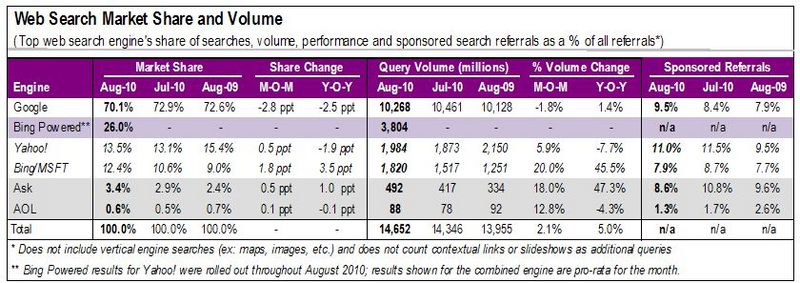
The article doesn't mention a rate at all or show data prior to 2011, so the headline should really be comparing differences between 2012 and 2011 and not mention 'rate'.
So, the percentage indicated in the headline isn't horribly inaccurate (Google's share also dropped by 2.5% between 2009 and 2010 and averages a 2.3% drop in market share per year over the past three years.)
Actually, in the final Pirlo did not have the ball the most for Italy because he was closely marked by Xavi. A central defender, Barzagli got more touches than him. It would be interesting to see the graph of that match.
Also your final assertion that teams set themselves up so their best players get the ball the most seems a bit off to me. Consider FC Barcelona. Lionel Messi is arguably their best player but you would be hard pressed to find a game in which he has the ball the most since he plays high up on the pitch as an attacker.
I agree with you in that single match analysis using this technique doesn't really produce any new insights. I think this analysis would be very interesting when comparing between different games however. e.g. comparing Italy's match against England where Pirlo was effectively given free reign of the pitch to their match against Spain where he was shut down for most of the match. I would love to get my hands on some raw data from Optasports!
On a tangent.. I'd love to see a heat map of Messi's movement for Barcelona (and Argentina). Whenever I watch him he's all over the place. And to my eyes, he's most dangerous when picking the ball up either from the midfield line or on the touchline half way up the field. In both cases, when runs at pace with the ball he's diabolically good. Any data/visualization to track that would be fantastic to see, especially filtering only on those instances where he causes real damage to the opponent (e.g. a shot on goal for him or a teammate)...
For any game from a major league, you can go to the soccernet game summary and click on GameCast to see a heat map for any player. Here's Messi in the Barcelona 3 - 1 Real Madrid from December: http://i.imgur.com/XEvpW.jpg
The whole article hinges on the lines of code metric being an accurate metric for how productive a team is. But how many programmers would be happy if their bosses paid them per line of code?
I would be inclined to agree with the premise of the article, but the evidence given is flawed at best.
No kidding. Sure feels like bending the statistic to fit your argument. I will concede that larger teams are less cost effective and the cost goes up exponentially compared to productivity as the team gets larger (per Steve McConnell: "Software Estimation: Demystifying the Black Art"). BTW the "Software Estimation" book is really awesome and in my opinion a must read for anyone in a tech company with a leadership role.
It's true smaller teams are more efficient. But I feel like it trivializes the complexity, comparison, especially when a lot of good detailed works on the subject already exist.
The problems that the article addresses are not the ones that I would have chosen.
I think the main problem that new users to Linux have is the steep learning curve. The author dismisses user friendliness with the implication that the only reason Linux is difficult to learn is because it is different.
The analogy given is vi versus a standard Windows word processor. I am not disputing that vi is a much more powerful program, but I am saying that it is much harder to learn than Microsoft Word. Using Word, without knowing the keyboard shortcuts, you can use the toolbars to do what you want and in doing so you learn the shortcuts, most of which are printed next to the menu items.
Using vi, without knowing any keyboard shortcuts, you can do exactly nothing. Arguably vi is much better off without toolbars because they take up a lot of screen real estate and would be difficult to implement from a terminal window, but that does not mean there is no such thing as user friendliness.
Another problem is the problem of hardware support[1], which the author does not address at all.
Having said that, I will agree with his point that since it doesn't really matter much to (with notable exceptions) most developers what features people not already using Linux would like to see, development is centred around people already using Linux and on more gentle slopes of the learning curve.
Desktop Linux doesn't have a learning curve; it has a learning cliff.
Linux cribs so much from other operating systems that it's reasonably familiar and easy to use when you first sit down, but the problems start when you need to go beyond using it as a dumb terminal: perhaps you need to set up a printer, or there's an issue with networking or power management. Now you're over the cliff. It can be a nightmare for a engineer like myself to fix problems, even though I've been using Linux since the mid-90s. An unsophisticated user would be finished.
An anecdote: I'm mainly an OSX user now, but I bought an eeePC netbook a couple of years ago for travel and tried to install the then-current version of Ubuntu. This was literally one of the most popular laptops on the market, and Ubuntu installed without a functional network device. Getting it working was not easy, involving a couple of reinstallations. Even then, power management was nonfunctional and the netbook got half the battery life as it did under Windows.
The real problem with desktop Linux isn't that it's hard to use or different; it's that the average user can expect to struggle with crippling bugs and hardware incompatibilities that are a nightmare to fix.
It can be a nightmare for a engineer like myself to fix problems, even though I've been using Linux since the mid-90s. An unsophisticated user would be finished.
I hear this a lot, but nobody ever actually describes the problem they have. You mentioned priting. On my minimal Debian box, you point your web browser at http://localhost:631 and click shit and then the printer works. (If you want to improve print quality / feature support, then you probably need to google to decide which driver is best.)
On my Ubuntu 11.04 box, you type "printing" into the thing at the top left, click "add printer", click "network printer", click "find", and click "ok". That's it. Then you have that printer in every application, and from the command line via lpr.
It can't get any easier.
The only way you can run into problems is if you buy a printer that's not supported by Linux. And I think that's where most people run into trouble -- they buy something unsupported, and then spend three months googling in the hopes that maybe it's not really unsupported. One time in ten, it turns out that it is. The other nine times lead to stories like "Linux never works".
Nope, shitty hardware never works. Linux just hides that from you less than Windows.
> Nope, shitty hardware never works. Linux just hides that from you less than Windows.
And that's the thing that Windows actually gets right. A typical user doesn't know nor care about OS-hardware compatibility. He/she buys a printer and wants it to work. It is up to OS to make this happen.
It is not the OS that makes this happen. The device ships with a windows driver disk. The manufacturer made it happen. Out of the box Linux probably ships with more drivers than Windows, but the process is much more centralised.
You could argue that Microsoft makes it much easier for manufacturers to make and distribute drivers (that work) for Windows than they can for Linux. Linux ships with a lot of drivers because that's the primary way you get Linux drivers.
Yes, you just learned the very thing that is under debate here: that unless your mom trolls though HN discussions, she would never guess that opening a web browser and navigating to that cryptic URL is the mechanism for installing a printer.
Oh, sorry, I left out the "click shit" part. Do some of that, too.
More importantly, you left out the "minimal Debian box" part. With modern desktop environments, you can just plug your printer, wait a few seconds for it to tell you it's installed, and your done. Way easier than on any other OS.
That's the configuration mechanism in a minimal system where just about everything is disabled. In any kind of system that a novice would be using, it shows up in all the expected places.
Is vi difficult to learn? I learned the basics immediately and was able to modify and save files and quit the editor (with or without saving) in pretty short order. I don't think it's difficult to learn, you just learn how to use it in a different way, and if you spend a lot of time editing plain text files, that makes a lot of sense. That's the author's point, I think: vi isn't less friendly just because it's written for a different class of people and used in a different way.