It is amazing, how much engineering goes into these machines - everything is designed from scratch for this form factor. It is also nice to see that the SSD are not soldered in place, though it isn't trivial to exchange them. The cooling solution for the CPU also seems to be great.
However, it is pretty unforgivable that the cooling sucks in air from the bottom where it would pick up any dust on the table and might clog the electronics of the power supply. Especially as it is not possible to easily clean the internals of the machine. If just the aluminum housing of the machine could be easily removed, I would consider this machine a great design - but not so as it is.
I wonder whether one should carefully apply some filter gaze around the air intakes to reduce dust intake into the machine.
I remember and miss the first Intel MacBooks, which came with an access panel for upgrading the hard drive and RAM, as well as an easily-swappable battery. Back then it felt like Apple was trying to make the best computer possible, not just a disposable consumer appliance.
> Apple was trying to make the best computer possible
With the latest MacBook Pro it feels like they're back on the right track. Heck they dropped the magic bar.
The issue with replaceable components is that they're often at odds with performance. If MacBook had user-replaceable batteries we simply would have less battery OR a thicker and heavier and more expensive computer. Literally you cannot have all.
Memory/SSD sticks take more space and cost more than a soldered chip (and they earn Apple more money, shhh)
Obviously, dust settles on flat horizontal surfaces, so having an air intake at the very bottom isn't optimal there. And yes, if the Mac stands in an office with daily cleaning, there might not be much dust, but still, if you run it for 5+ years, it will suck in a lot. If it is in a corner of a small desk with lots of other stuff and not daily cleaning - e.g. at home, there can be considerably more dust.
My MB Pro started failing for thermal reasons after 5 years, fortunately, the local service partner could clean it for a tip. After that, the thermals of the machine were distinctively improved.
Dust in the ventilation is just a matter of time, a machine should not fail because the user can't clean that dust.
I live in a fairly dusty environment that also gets quite hot in the summers. I have to clean my i9 16” MacBook Pro’s cpu fan and heatsink every 3-4 months or else the CPU starts throttling. The MacBook Pro is relatively easy to clean. You just need to know how to remove the bottom cover and the fan plus heating assembly is east to access. But it used to be much easier with the older models. This Mac studio’s design makes it very difficult to clean the heatsink and fan blades. Also the heatsink looks like it has lots of thin narrowly spaced fins, something that will get clogged up really fast in a moderately dusty environment.
I hate to break it to you, but there's not a PC / laptop on this planet that will not fill up with dust and eventually clog and die. You gotta keep your stuff clean. Blow it out with some compressed air cans every 6 months. It's not really that big of a deal. I've cleaned literally thousands of computers in my lifetime, they all get dirty, and if you don't clean them, they will all fail.
Also, I think you are way overstating how dusty this will get. It's not going to be any worse than anything else built in the last 20 years.
Dust doesn't crawl on to a desk from the floor; it settles in from the air. If you're placing a new computer on to a previously dusty surface then, yes, you might see an initial spike in dust coming in. After that, I'd bet that the dominate source of dust is air.
I think the difference there is that the Mac Studio will spend a lot of time with the fans at very low speed, and any dust that settles near the intake during that time will get sucked up later when the fans ramp up. If the intake were higher up the recently settled dust would stay on the desk and you'd only pull in airborne dust.
The front fan grille on my midi tower (Fractal Meshify) collects a lot of dust in its intake, I presume it is because any dust which would have fallen onto the desk in front of the computer instead gets pulled into it by the fans. From my point of view having the intake lower as the Mac Studio would not noticeable increase the dustiness.
Once dust is on a surface will tend to cling to that surface unless it is wiped off or blown off by a significant airflow. A low speed airflow like a fan intake will probably not pickup much of that dust. Most of the dust will come in from the air in the room.
It's funny, the first impulse I had when they presented it was that maybe it would look even better turned on its head - making the Mac Studio engraving visible. Could help with possible dust intake as well, maybe.
I know that a lot of people hates apple, but I love to see their hardware and I think they are innovating in certain areas that I'd hope amd/intel start copying, like the unified memory, if they start working in that direction it will change the PC world forever (also they need to add more memory channels to their processors, 2 is just not enough for this feature).
Also the PCB design looks cool, but they are not the only ones, if you buy a mid/premium gaming motherboard they are also beautiful.
Yes, but you need to setup in the bios how much memory you want to dedicate to the gpu, while apples approach afaik doesn't gpu/cpu can access the same memory, so if you for example want to game and the game requires more memory than the cpu you can get as much as ram you have.
I'm on having the cpu/gpu integrated, but more powerful, if apple can do it, then amd/intel can do it too, but I suspect amd will lose their dedicated gpu market, while intel could gain more with this kind of move, but I suspect that intel doesn't care too much about the enthusiast or end users as apple/amd (I mean that apple market are end user and not server/enterprise like intel).
Bundling CPU and GPU is not feasible in the present day for high end systems.
There are use cases where you need say HBM2 memory. Or you need 4 outputs (most motherboards have just HDMI+VGA).
It’s easy for Apple to do, because they have 0 skin in the game in gaming or AI or even GPU compute markets. I don’t think it would make sense for AMD to do it.
It would make sense for Intel, to compete in entry level gaming market, but that’s it.
IMHO it’s just not feasible if your product is a general purpose GPU, because there’s a lot more to it than just the processing unit.
The M1 Ultra gets fully half of the performance of a desktop RTX 3090 in both synthetic and real world benchmarks.
That’s extremely impressive. Sure, no one has CUDA except NVidia but it looks like Apples GPU architecture really truly does work quite well at this stage.
I wouldn’t be shocked to see them catch up to the highest performance GPUs in the next 5 years or so. I mean I also would t be shocked if they didn’t, but it seems like a reasonable possibility at this point.
Which is crazy for a SOC, especially one borne from mobile phone architectures.
I also feel like M1 rackmount servers could be amazing if Linux ran on them.
So the m1 ultra is like a 2070S or a little bit slower than a 3060ti? A ryzen 5950 also has a similar amount of cores, and if most of the power efficiency is coming from being a process node ahead due to special tsmc contracts and covid, its not a durable advantage either because it is not due to technical innovation from apple.
The m1 ultra and max basically targeted for video editing as their target market. Same with the m1 max pro with it’s xdr screen to become a great hdr editing laptop. M1 studio similarly is targeted for the video editors that want a mac mini made for them.
Your paying a lot for all of that GPU compute with the amount of die space it takes up. Apple's Intel CPU options were also pretty old and low power, so it feels like a much bigger difference if you are stuck on apple platforms to do your work, like iOS.
If apple kept up with x86 CPUs the difference on macOS wouldn't have been as wide. When you compare a Ryzen 5000 series with the same core count, they are fairly comparable in compile times AFAIK.
> they are fairly comparable in compile times AFAIK.
Yeah I can confirm that. I have an 8 core ryzen 5800, and its performance when compiling rust code is almost identical to my 8+2 core macbook pro.
The macbook pulls ahead slightly in single core performance, but I think the ryzen takes longer before thermally throttling - which makes sense given its a desktop workstation.
Yes unified memory already exists it isn't some newfangled thing. That said Apple is the only modern consumer brand doing it for a Laptop/Desktop. It definitely has some downsides, but it also does have some upsides.
I know isn't something new (amd announced it iirc back in 2013 with their apu line) but afaik no one implemented the same way as apple, the gpu and cpu are in the same DIE (I'm not sure if this is the word or how is spelled) but they are not a unit, in apple design both can access all the memory and share between without copying or reserve specific memory from the bios for the gpu.
And as already referenced AMD APUs, including the chips for XBox and Playstation. Hence the entire "hope that AMD starts copying" from the original comment doesn't really fit for unified memory.
I do hope these internals and designs "trickle down" into actual builds and products someday. I would love some small beefy desktop workstation similar to the XBox Series X, kinda like a PC take on the old trashcan Mac Pro.
Several companies are trying that. The Corsair One series is XBox/trashcan Mac sized and plenty powerful. HP has their Z Mini series of Mac Mini sized workstations. Intel sell their NUC and NUC Extereme kits for people who are more DIY inclined.
I'm not an expert on this by any means, but I believe the XBox still uses dedicated memory for the GPU, which is slightly faster than the one reserved for the CPU. The Playstation does use a single block of shared memory.
Invention is different from innovation. The way Apple has the memory in the same silicon as the CPU and GPU all in a laptop and now desktop... has anyone else done that? It looks like an innovation.
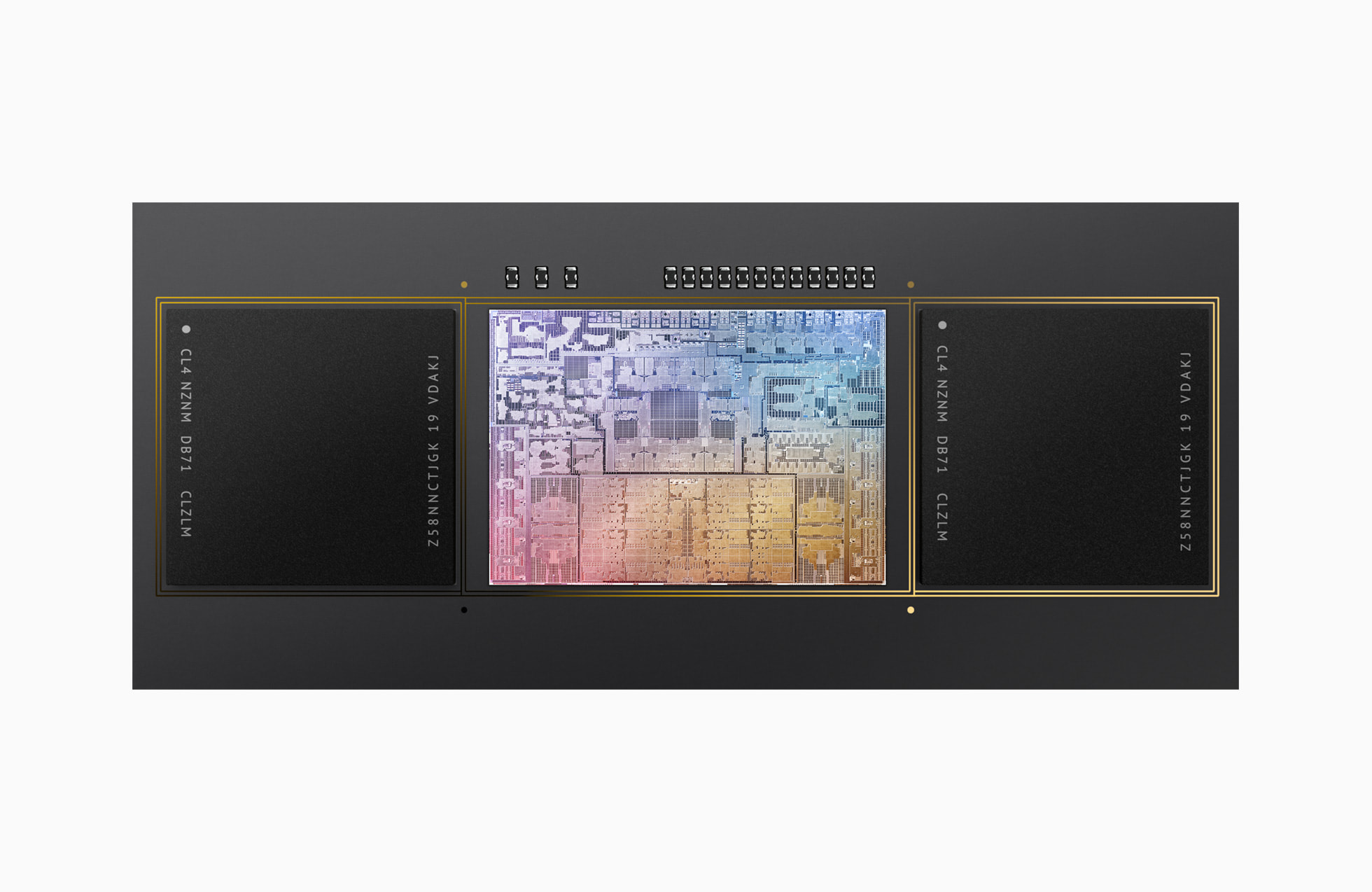
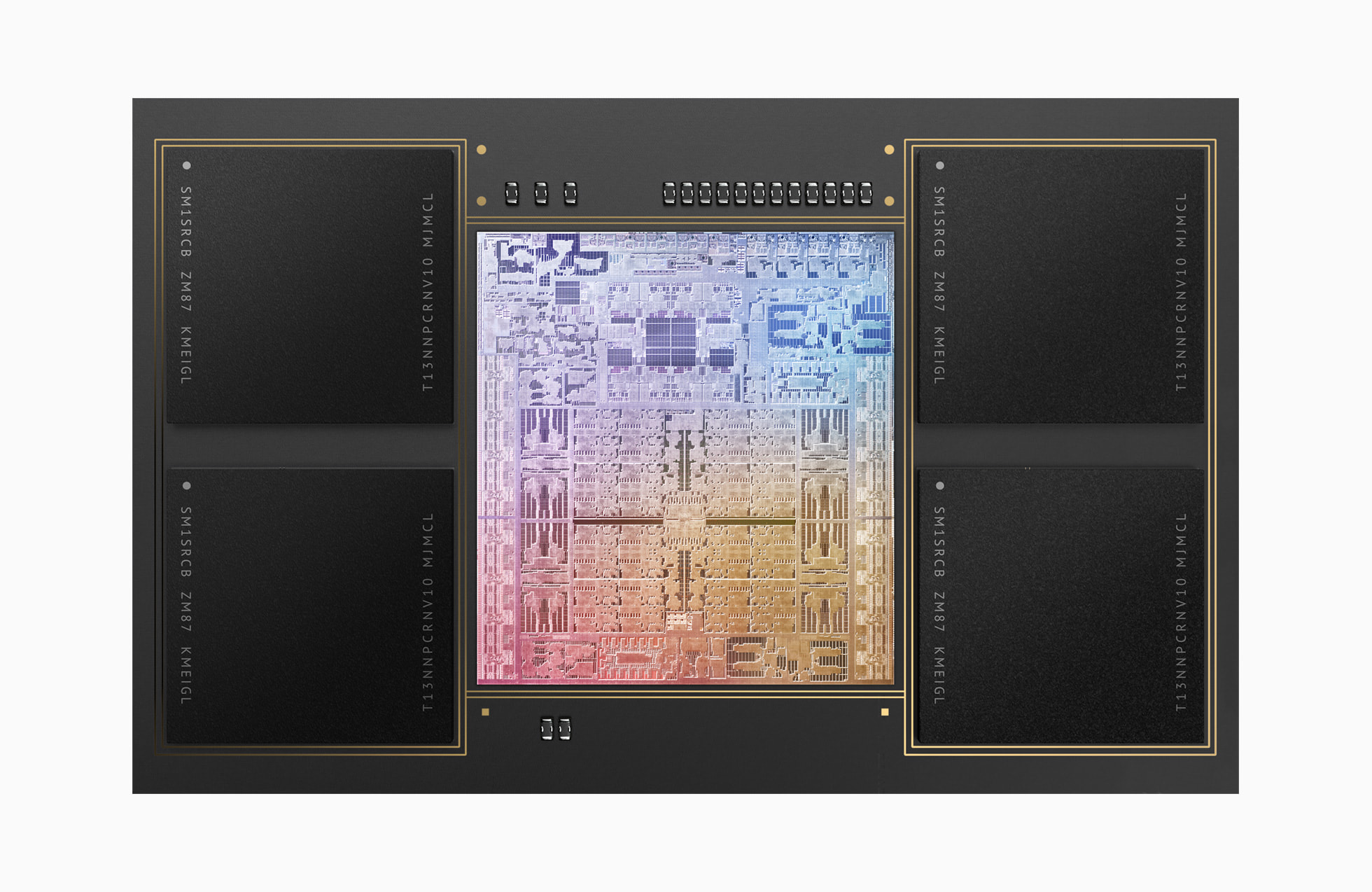
They use CoTS LPDDR memory chips running at the same JEDEC timings as everyone else. Yes, they glue these chips to an interposer board like a GPU with HBM, but unlike those GPUs they aren't doing it for any performance requirements. Keeping it on package just makes things more compact so they can shrink the motherboard even more.
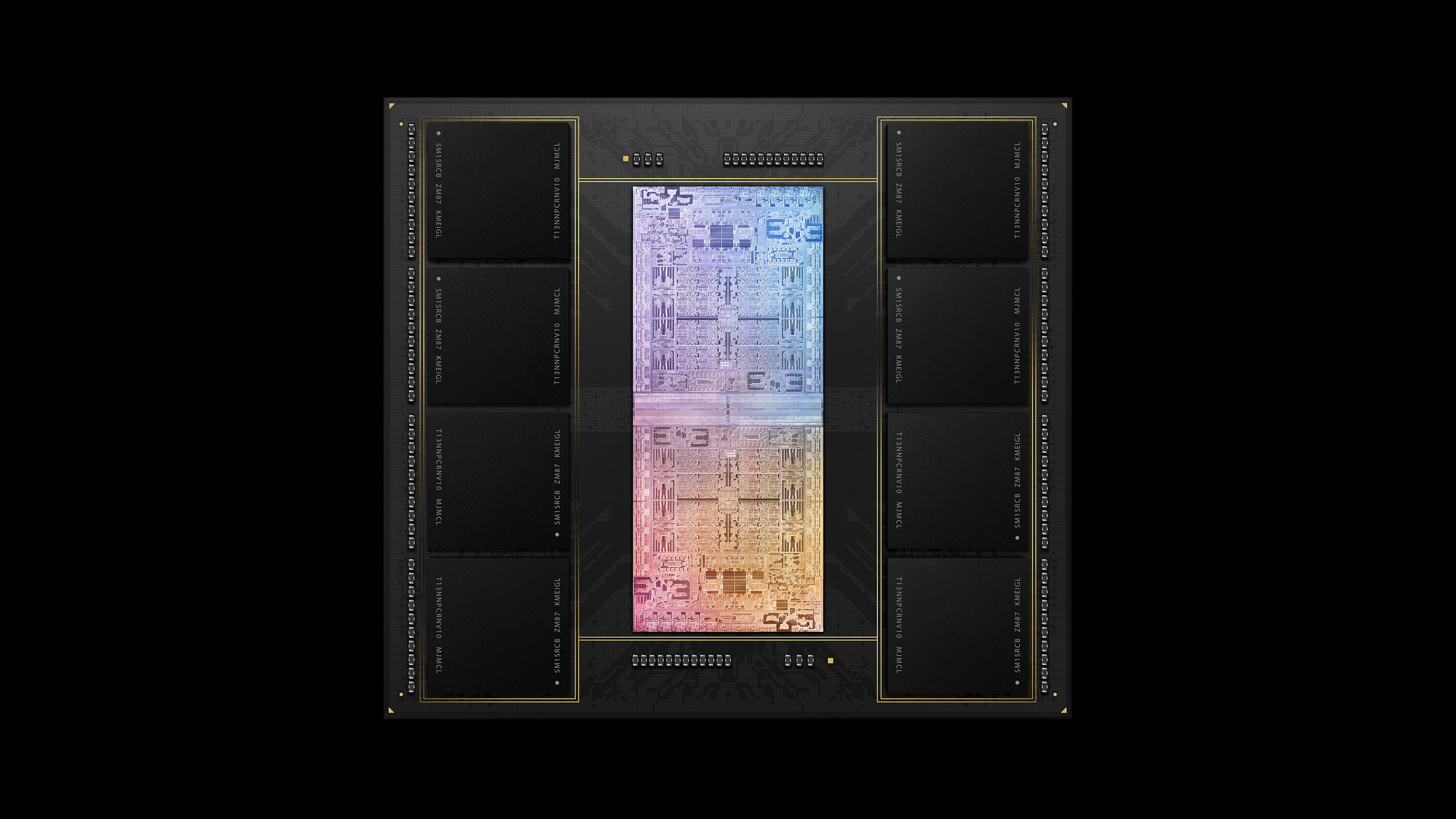
The size of that M1 Ultra package is just enormous. I’d love to see what it looks like under the heat spreader.
It’s also interesting Apple is cooling both sides of the chip. Is that just for efficiency so the computer is quieter? Intel/AMD chips that put off way more power aren’t cooled from both sides right?
> The dual blower is completely non-standard, as well. Goldberg says that the engineering team found that by splitting each impeller of the blower by a divider partway up its height, they were able to make adjustments using the disc that allowed for different pitches of the blades above and below the divider.
“That results in drawing different amounts of airflow from each section of the box so we can tune for the thermal performance based on the cooling needs, adjust the height of that divider, adjust the the pitch of the blades and each section and then kind of optimize for thermals and acoustics at the same time,” says Goldberg.
Apple has really stepped up their cooling game in the past few years.
The heat sink in the iMac Pro was where things really started to shift. It keeps the Xeons in those machines reasonably cool while being whisper quiet at idle/low load and reasonably quiet at load. They really kicked it up a notch with the Mac Pro, which remains nearly inaudible at all times, and now that’s carried forward into the Mac Studio.
Really nice work. I’d love to see this kind of innovation in more standardized PCs — the NH-D15 and front fans in my custom built tower do a good job on thermals but their acoustics leave something to be desired, despite Noctua coolers and fans being some of the quietest on the market.
They stepped up the game with the original retina MBPs too (first shrink of the “unibody” case), but it couldn’t keep up with the high end mobile Intel thermals. That model was (enviably) quiet compared to my previous gen MBP.
It’s basically never an i9, because once it hits 70°C it starts throttling quite rapidly and then stays stuck between 1.0 and 1.4 GHz clock speed for at least 5 minutes, and what good is an i9 running at 1 GHz?
Their laptop cooling has been absolute dogshit for the past (at least) 10 years.
It’s more of an inadequate cooling combined with Intel releasing CPUs that run just hotter and hotter.
I can’t wait to upgrade to a 16” MBP with an M1 Max (or next gen if they release it by then). There are still some essential tools in my workflow that don’t work all that great on ARM.
If your i9 16” throttles down to 1 or 1.4ghz, then most likely it is clogged with dust. Open the bottom cover and clean both the heat sink and the Fan blades properly. I need to do this to my 16” i9 once every 3-4 months to prevent it from throttling under load.
Interestingly, sharing an external screen using google meet and running something like npm install will easily throttle the CPU even if the CPU usage never shows anything above 15% of use.
So I had a thermal problem with my 2018 15" i7 MBP that sounds very similar to what you describe. Temps hit 60° and then get heavily throttled. It started happening after a repair to the keyboard. After dealing with that for 6 months I brought it in to Apple and they fixed the issue by replacing the mainboard, I think. Since it's very rare I see throttling for my use cases (compiling, some gaming).
My iMac once was super quiet, but many years later is less so. Unfortunately, I cannot clean its fans, which would probably reduce the noise levels quite a bit.
You can take it to an Apple certified repair center to get it cleaned.
But keep in mind the noise could also be caused by worn out fan bearings. You'd need to replace the fans to get the noise level back to 'as new'.
Yes, its just between 100 and 200€ of service charge, as they have to unglue and glue back together the machine. And carrying an 27" iMac is also a challenge - you don't want to have it damaged in transport. This all is possible, but it shouldn't be necessary. Didn't stop me from buying and loving my iMac, but it is not good design.
I am planning to get a Mac Studio as the replacement for that iMac, but I would be happier, if easy cleaning of the fans would be possible.
Can't you just pop the screen off and clean it? I had an iMac; the glass is held on magnetically and there are a dozen-or-so Torx screws behind the bezel.
No, that was an earlier design. On later iMacs, the magnets were replaced with glue. So to perform any service on the machine, the repair shop has to cut through the glue and after the work glue the Mac back together. Which, for a desktop, is pretty unforgivable in my eyes.
That glued on iMac design was really stupid for a desktop that uses fans. Even my older generation iMac with the magnetically held cover is too much of an effort to clean. And from the looks of it, this new Mac studio suffers from ur same issue. While you can access the fan and the heartsink, it requires too much fiddling and too many screws to make it easy for any user.
I’m guessing it’s like everything else: cost and margins. Most people either aren’t willing to pay for it, or aren’t given the option because people think they won’t be willing to pay for it.
Apple only has something like 10% of the desktop market yet they seem to be the only company in that space doing anything interesting. Dell, HP, Lenovo, and all the other big desktop computer makers look pathetic in comparison. I say that as someone who has only bought Lenovo computers for the past 15 years.
Is there any chance at all that six months from now Dell or HP will wow us with something that is faster, quieter, and as aesthetically interesting as the Studio? Or will they crank out another version of a black sheet metal case that is loud and hot and inexpensive? There have to be people in those companies that want to do something interesting, right? Or do they assume that anybody with money and taste are already out of the Windows market?
Maybe it is all the fault of Windows. There's a pretty good story about the problems of Windows elsewhere on HN right now. The comments there are so damning it makes me think nobody believes in the platform anymore. You know how there's no M in FAANG? Is Microsoft stuck with people not good enough to work elsewhere? There might be no point in building interesting hardware that is ultimately going to run Windows.
Personally I would be more than willing to pay a premium for exceptionally quiet PC cooling, even if that meant having to use a case, CPU cooler, and GPU cooler all designed for each other.
They make passive CPU coolers that work fairly well on modern processors. Additionally, you can set fan curves on a GPU to only trigger in the case of a legitimate emergency (eg. 85c+, which you would never hit in casual non-gaming workloads), which would probably get you 90% of the way there.
Used to own an Intel. Recently purchased an M1 Pro, and it’s astounding how quiet it is.
My old Intel MBP would sound like a jet engine just by opening Chrome.
This one… I hammer it all day with multiple servers running, JS projects, tons of tabs, Docker containers, many misc. software utilities… not a single noise.
I’ve only heard the fans once while using Handbrake.
The 16” M1 Pro also has amazing battery life. I regularly use mine for a whole day’s work on battery, while with the i9 16” battery rarely lasts more than 3-4 hours under similar loads.
I own both a 2019 and 2022 MBP. The former is the loudest laptop I've ever owned when doing day to day compute tasks. The latter is the most quiet. It's shocking how bad the older Apple laptops are.
Yes, addressing that was a major theme when they redesigned the MBPs in 2021. People complained that they looked chunky compared to the sleeker 2016-2020 models but acknowledged that cool and quiet might be worth a little more utilitarian appearance.
My work gave me this and it’s the worst! I thought mine was faulty. Sent it for repair 2 times and then I realized it’s just garbage thermals and noise. The i9 + dGPU is too much for that form factor.
The optional i9 upgrade is a bit of a trap, to my mind. The regular i7 version has pretty reasonable thermals by comparison, with marginally lower performance.
I have hit more cases of "burnt a body part" with Windows machines than with Apple laptops. Apples tend to run with more warm surface area because the aluminium spreads all the heat on the entire surface, but high-power Windows laptops can be downright nasty if you manage to touch the area around the fan outflow because all the heat concentrates there to form an incredibly hot spot.
>different pitches of the blades above and below the divider
I thought that was interesting, so I looked for it on the video: https://youtu.be/IY0gRMpT4AY?t=878 If there's a difference in blade pitch, it's not visible from that angle. What is pretty clear is that the split isn't exactly halfway down, maybe 55/45 instead of 50/50.
You would probably need to cut an impeller up to see a difference, or xray it.
I would also be interested if someone swaps out the blowers and see what difference the Apple impeller makes. I would be surprised if it's more than 5%. But injection molding makes fancy geometries very cheap, and if you're making the molds anyway you might as well pick up the easy design win. Amortized over however many millions they're going to make, the NRE costs are going to be pennies per unit.
It's not beating Moore's law, it's beating die yield curve limits.
Working near the limits of manufacturability will result in occasional defects. If you only have to have a few eight-core 10x8mm chiplets and a more reliable 12nm process node interconnect die come out defect-free, that's much easier than trying to get all of that on a single giant die with 64 cores and the IO on the same die.
To exaggerate, if each chiplet has a 50% chance of failing, on average you have to make 16 chiplets to get one good multi-package chip. But you'd need (2^8 * 8) = 2048 to get one contiguous super-die. with no defects.
What I've heard is that the M1 Ultra has to be all contiguous to exist. The interconnact cannot be assembled later. All those M1 Ultra chips are indeed 64 cores and the IO on the same die. https://patents.google.com/patent/US20210217702A1/en?oq=2021...
Sure, it's not interconnected as in multiple sockets on the motherboard talking over QPI, but it's a silicon interconnect. The M1 Ultra is two M1 Max processors on an interconnect with some DRAM.
Here's the Pro, with 8 or 10 CPU cores and 14 or 16 GPU cores, depending on die yield issues where they might have to shut off a couple cores:
Yeah but those two Max chips that make one Ultra have to be next to one another already on the wafer. That leaves no room for error or picking up a chip from somewhere else.
There are a lot of ways to win Tetris with 1x2 blocks!
If you make an M1 Max wafer there are a lot of ways to spin out 8/24-core Maxes, 10/32-core Maxes, and adjacent 10/32 core Maxes into an Ultra. Nothing in the patent seems to indicate they have to decide which ones to use before testing the wafer...
Most Apple products I've owned, I've ended up seeing inside at some point in their life cycle. It makes a difference to me knowing that they're nice inside.
But also, it's hard to think of products that are nice on the outside but ugly on the inside. I suspect it's because some people care and some don't, and both inside and outside reflect that.
But not technically the best designs. They run high voltage next to unprotected low voltage which in the case of water ingress can damage things like the CPU. This may not be an issue with a desktop but it is with a laptop or keyboard. Alternatively you could coat a board if there are places where you can't get around such design situations but Apple doesn't do that either.
“Water” also means condensation or humidity from just the weather or even some rain sprinkles.
They seem to design their products for Cupertino weather , specifically the weather inside their spaceship lab and fake model homes. Or is just good ol’ “planned attrition”..
> condensation or humidity from just the weather or even some rain sprinkles.
I find all these comments here very strange indeed.
The Mac Studio is a desktop. Like any other desktop from any other manufacturer it is intended for use indoors in a typical home or office environment.
If you require a device that works outside of "normal" parameters then there are specialist industrial PC manufacturers who will build you something that will deal with humidity, dust, vibration and temperature extremes.
99.999999999999999999% of people on this planet do not require the extra mechanical designs (and associated expense) of an industrial PC.
Hence Apple and every other commodity PC manufacturer on this planet designs for the typical home or office.
Edit to add:
Look at the Mac Studio specs:
      - Operating temperature: 10° to 35° C (50° to 95° F)
      - Storage temperature: –40° to 47° C (–40° to 116° F)
      - Relative humidity: 5% to 90% non-condensing
      - Operating altitude: tested up to 5,000 metres (16,400 feet)
I'd say that pretty much covers everyone on the planet, and if your house or office falls outside of those parameters then you probably have bigger personal health problems to worry about (caused by living/working in such extreme conditions for long periods of time) than whether your Mac Studio will boot up. ;-)
Without knowing much about temperature specs, that minimum operating temperature seems quite high. This week, here, it'll be a bit colder than 10° C and I don't live in a particularly cold place.
Name another desktop (or laptop even) that’s designed for water ingress. Sure, some keyboards have channels to run a cup of coffee away, but I want to know who creates a “technically the best” design that isn’t a massive brick-with-a-handle MDT.
I don't understand why manufacturers haven't waterproofed keyboards. It's such a common failure mode you'd think it's be an easily marketable feature. And they're already doing it for phones.
The direct comparison today would be the Mac Pro which has both a very well designed (though not super bespoke) interior, and is accessible to users too.
Can you explain how you come to this conclusion? Maybe I'm much more critical of Windows because I have been using it for the last 13 years (and will be using it alongside macOS and Linux in the future) but my experience was the complete opposite.
I switched back to macOS after having been away for 13 years and I felt right at home. System Apps and Settings generally are and worked the same. Sure the UI might have have changed a bit but mostly by repositioning things or adding a feature. Almost everything I learned about the UI 15 years ago still applies. The disk encryption and firewall settings were still in the same place, same goes for the touchpad and everything else.
It was the total opposite to the Windows 11 VM I set up after. The settings app had a major redesign again and instead of relying on my memory I had to use the search function after failing to find some settings.
Some of it is too much though. Why are those black stickers on there covering up parts of the components? It's like they were ashamed of the schematic or something.
Possibly a mix of cosmetic and functional. Maybe they identified that dust buildup can cause static issues. Maybe the plastic addresses some solder filament problems. It might also increase the device’s tolerance to vibration, or performs sound dampening.
Interesting observation from the video (to me at least) is the move from IEC C7 (figure of 8) to IEC C6 (cloverleaf) AC power input.
This introduces a functional ground to the chassis, and so perhaps (amongst other things) addresses some of the static/dust build-up concerns that others here have commented on ?
It seems there are two slots for SSDs. I'd be curious to know which storage configurations populate both slots versus just one. If Apple offers SSD upgrades like they do for the Mac Pro, it would be nice to order a studio with one slot free.
Yep apparently two non-soldered modules. From what I read, the Pro’s upgrade program was introduced after the fact. I’d bet Studio will follow suit if there’s an aftermarket interest, and it’ll be repositioned as the semi-upgradeable amorphous version of “xMac”. It’s otherwise perfectly suited for the long lost mid tier desktop Mac, and it’s safe to assume no other internal components will ever be upgradeable again.
Isn’t this sort of how the iMac Pro worked? Didn’t it have slots, but they would only work in single or tandem, not as two separate drives? And you couldn’t upgrade your current drive, you had to blow it away since the drives were tied through the Secure Enclave?
Maybe I’m misremembering.
But it wouldn’t surprise me if this was a version of that.
It's not the secure enclave thing. These aren't SSDs. These are raw storage modules. The SSD controller is built into the M1/T2. You are upgrading the raw storage behind a single, global SSD. Of course when you change the layout of the raw storage, the data arrangement changes and you have to reformat. It'd be like swapping out chips on a regular SSD and expecting your data to still be there.
Agreed. Maybe a slightly different manufacturing process that makes the fancy laser lancing impossible? Maybe they don’t have those machines anymore (IIRC there was only really one company making the equipment to do it)?
Yea, the pre-unibody Macbook Pro had invisible power and camera lights. No idea how they made the light go through a piece of seemingly solid metal. Always thought it was a cool effect and it's too bad they dropped it.
I don't really care how a company arrange their PCBs. It's just like writing code, as long as the code is correct, easily readable, expressive and have great eventual performance, it's a good code, you don't have to keep your lines in a visually beautiful perfect symmetry to achieve that.
The same is true for PCB design: as long as the board is correct, reasonable, stable and have good performance, it's a good board.
Based on the video, in order to clean up the dirty fans in this machine (something you'll start to do eventually), you'll have to:
1. Un-glue the button rubble stand ring to access the body screws,
2. Remove the exposed power supply (Risk getting shocked or worse),
3. Detach almost everything (screws, tapes and cables) you can see, so you can un-mount the main board to access the fans.
Then, after done cleaning, you have to do everything again but in reverse.
My opinion is, Apple can make their circuits look like a Steve Jobs thonk pose, but if an user has to go through all that many trouble and risks to preform such simple and (rare but) routine task, this design is bad.
> if an user has to go through all that many trouble and risks to preform such simple and (rare but) routine task, this design is bad
You're assuming an Apple user is meant to service their own product. That's not the case as far as Apple is concerned. You have an issue, you drop by the Apple store (or send your device in) and they repair it for you.
Determining good-ness or bad-ness of a design has to take into account the intended usage and design goals. Whether a customer should be able to repair their device easily/at all, is a whole separate topic. Apple doesn't think so and their design decisions have clearly reflected that over the decades. As far as that goes, whether the end user has to dig through 20 layers of hardware before cleaning a fan is irrelevant. What's relevant is whether Apple employees who'll be fixing/cleaning these devices will be wasting too much time for the most frequent support requests. That's what Apple should be (and most certainly is) optimizing for.
Also note that the majority of the end users will not have the time nor the interest to repair their own devices, especially when in most cases, their repair is covered under warranty. A lot of people with the technical skills far more than needed to to the self repair fall into this category as well. I've been modding and hacking expensive hardware for decades mostly for fun, but also for practical reasons, in order to add to/modify behavior of the hardware. Even I have little interest to repair my Apple products I have paid premium dollars on. I increasingly value where I spend my time and I let Apple do my laundry for me.
I must also mention (given the high degree of Apple/Google/Facebook/... bashing on HN) that Apple is among the better, if not the best, manufacturers in terms of warranty service and support (at least where I live). I have requested warranty services for dozens of products and not once have had to "prove" my case, or so much as try to convince Apple of an issue. Compared to every other worse interaction with other brands, I will continue to pay top dollars for Apple products even at the cost of whatever the hot Apple knocking topic of the day is. Having said that, there are of course tools that I need full access and repairability as a given and I never go with Apple in those cases.
And this means very expensive prices for having the machine cleaned. I agree with the parent, cleaning should not require an expensive and risky strip and rebuild. This is, at best, a misguided design.
Cleaning becomes repair if it's affecting your machine's performance. If it's not affecting performance, why would one care if the inside of their machine that they can't see nor access, is dusty or not?
EDIT: OK, let me help you arrive at the destination: your machine gets dusty and slow, just as if its electronics was failing. You take it to Apple and they fix it under warranty or ask for some $$ if it's out of warranty (given that they have to spend time doing it, time that you would be spending yourself, whether it's easy or hard to open up the machine). Calling it cleaning or repairing is splitting hairs. If it's degrading performance, it's a problem, if it's not, it's cosmetics.
BTW, all this fuss with cleaning fans — no one I know opens up their stuff and clean the fans until the device malfunctions. You are in the small small minority and no company, including Apple optimized for your habits.
You should be able to avoid having your machine’s performance degrade simply by its inevitable coexistence with dust. If you want your worldview to make sense, please invent a fan and computer interior that does not collect dust.
Yeah, but with most tower-style computers and even most Apple laptops it's easy to clean after the inevitable coexistence with dust: once a year, remove the screws and the bottom (or in case of a tower, side) lid, apply a vacuum cleaner, close it up again and that's it.
The nastiest opponent to cleaning that Apple sells is the iMac lineup after the Late 2012 iMac. The iMacs before had their display glass attached to the frame with magnets, with 2012 Apple switched to adhesive... which makes servicing these really painful because it is easy to break that glass and pretty difficult to separate the front glass from the panel.
If you have cats, dogs or other beings that shed fur though around you, I'd recommend once every six months.
The key bit is "their machine that they can't see nor access". If I could easily clean out my macbook's fans, I would, for regular maintenance, so it doesn't get to that point. It feeling like I'm risking everything but simply opening it up increases the liklihood that it will get to the point of needing repair.
You're in a small small minority who spends time cleaning fans to avoid slow down of a machine. The rest of the world only care when they hit that point after which they send their machine in for service.
I took apart a 2010 Mac mini the other to install an SSD. It’s basically been running non-stop since new in a corner of our office for over a decade. Sure, there was some dust but it wasn’t at the point where it would affect performance. A quick wipe with a soft paint brush and it was as good as new — the first time we had ever opened this machine.
I don’t understand the insistence that we must regularly clean our computers, it seems daft. Maybe vacuum your house/office once in a while. The computer breathes the same air as you.
On my mac, I'm not a part of any group, because I'm highly discouraged from doing so. I can with my stupid gaming pc, because it's literally 3 screws, and if that's beyond the capacity for people to do occasionally, then that's a pretty fucking low standard. To me it should be like blowing leaves out of your cars engine compartment. If people around me don't do it, even though it's extremely easy, then that's fine. If people feel like "only the ford dealer can fix this" then that's not fine.
> You're assuming an Apple user is meant to service their own product. That's not the case as far as Apple is concerned.
> Determining good-ness or bad-ness of a design has to take into account the intended usage and design goals. Whether a customer should be able to repair their device easily/at all, is a whole separate topic
I was just talking about the product design itself, did not touch the self-repairability issue at all.
There are certain expectations a device should be providing, been Apple does not grant them the exception. No, Apple is not a special company that produce magic rainbow out of their computer/phones, it's a company that produce digital product and service, just like those in Shenzhen, Apple is not special. They're expensive, they're a monopoly, and they hire some good people, but they're not special, keep this in mind.
I would complained the same thing if Dell or Lenovo designed their wind system like that. Fun fact, I kind like how Dell designed their OptiPlex MFF system, at least I don't have risk my life trying to clean them. But of course that computer, not a Mac.
But with all that said, I'm not here to stop you. If you want one (because it look beautiful I guess???), then treat yourself. I'm just here to complain what I saw as a consumer.
Had this same thought when I watched this teardown when it came out a few days ago.
I'm a big fan of the power/efficiency of the M1 (and all variants), but it's completely ridiculous that the teardown is so involved to get at the fans/heatsink for cleaning.
Cheaper to send the whole machine to Apple for servicing? I worked at a company where most users had simple PCs with dust filters and it took 5 seconds to clean those when fans started ramping up due to accumulated dust. I can't really see how it would be cheaper to pause all work and send the machine somewhere else for cleaning.
Heatsinks and thermal pastes, no-one really cared since they should be fine for years until the machine is replaced anyway.
I've definitely cleaned my work machine by myself. I imagine my employer also appreciates it, since the alternative would be to be without a work machine for however long.
> in order to clean up the dirty fans in this machine
Maybe do something about the dirty air instead? Also, unless in a dusty industrial environment, by the time a computer fan and chassis is filthy, it's already legacy equipment. If a computer is used for work, to generate income, replacing it every 2 years is the cost of doing business and a write-off. But I suppose if a typical Mac user, one would have to go through the trouble of blowing out the dust every 4 years.
Or like, clean your room / house for a change. A vacuum and dust cloths go a long way. A roomba isn't enough. HEPA filters should only be used for the rest, if any, but those small particulates won't affect the fans much.
At minimum, Apple should be required to perform a cleaning for free. That would quickly ensure good accessibility.
Equally, the cost for a keyboard exchange on a laptop should be capped at about 100€.
M1 Mac Mini. It's like 2-3x cheaper, and already great.. (I don't understand how the OS and apps on M1 are so much more responsive than a equivalent-multi-core Intel)
Don't game on macOS though, so use the leftover cash to buy a decent gaming PC (or get in line for a Steam Deck)
I own the first gen M1 lowest spec (8 GB) MBP. I can run XCode / Android Studio without any problems. I'd go with 16GB next time, because I sometimes run Xcode, Android Studio, VS Code and more at the same time which is too much for 8 GB. The M1 does handle memory really good though.
Can't say much in terms of gaming but it runs Zwift perfectly fine, which is the only game I play.
There aren't too much games that runs on macOS and less even that run on arm without rosetta, so I agree that he should just buy a PC for gaming (maybe a steamdeck), I also own a Mac mini m1 (16gb) but I'm tempted to upgrade to a MacBook Pro for the next gen, I really miss the ability to use it not only in the desk.
Also I'm curious if the entry level Mac studio will make a difference when compiling your app, I have a rust side project were it takes a while to do a clean compilation and 12-15 secs when doing incremental compilation (it really sucks when you need to wait "that much" to try some things out, mostly when working in the UI and tweaking some things). If this new Mac could take that to 5< secs It would be a huge upgrade, if not then the Mac mini is worth the bucks.
It's quite overkill for even intensive video editing. There are a number of YouTube videos of people downgrading from a m1 max to pro because the max was a waste of money and battery life.
I just wish the M1 Pro could drive 3 external monitors. It’s the main thing keeping me from dropping down to a Pro on my next machine. On my 2019 16” I drive triple portrait 24s, but I would need a Max to do that on a 2022.
Here’s hoping the M2 architecture has HDMI 2.1 support and the gpu can do triple monitors from the beginning.
My M1pro drives the laptop, a 4K, a 2k, and a fourth display by wirelessly air playing to a Roku, though I could completely understand that’s not an idea solution, depending on what you’re sending to each screen. The Roku connection was easily capable of running full screen video.
While I wouldn't be in the business of using 3 24" displays, I think not being able to have two external displays would be a deal breaker. I typically use my mac's screen and a 30" external at 2560x1600
Programming: The only reason I'd be tempted to go for the Studio is so I could get 32GB of memory, but TBH 16GB w/ M1 is more than enough for the vast majority of programming workloads (or at least the type of work I do), and is a very compelling buy at only $899. If you've already got a monitor, mouse, keyboard you like - no real reason to not want it.
To move to 32GB of memory means you need an M1 Pro, Max, or Ultra...so you're either going for a Mac Studio for $1999+, or a 14" MBP w/ RAM upgrade for a minimum of $2399. You get a better CPU and GPU with the studio than the MBP for less money.
Assuming you get minimal benefits from the better CPU, is it worth it spend the extra $1200+ to go from 16GB to 32GB of RAM? Probably depends how long you plan on keeping the machine I guess.
Gaming: I have no idea...gaming is the only reason I boot up my Windows PC. The M1 GPU seems solid but the M1 Pro/Max/Ultra do have measurably better GPUs. They all do great in certain synthetic benchmarks, but real-world performance is another question entirely. The vast majority of games will not be written for M1 natively, so you'll be running them via the Rosetta 2 x86 translation layer, which also will impact game performance.
The mini is a great machine, but for me 16gb was just too little RAM for my day to day (I used the 16gb MBA for a year). I ended up with a 64gb max MBP. A 32gb mini would probably be a great value/sweet spot which is why Apple likely doesn't offer it.
> A 32gb mini would probably be a great value/sweet spot which is why Apple likely doesn't offer it.
Oh come on. That’s actually the classic apple move to have a low end entry product and a higher margin upsell product which is where all the sales happen. It’s why their phones start with low levels of storage (pretty much have to buy the next step up at minimum) and conversely why there is a pointless higher end storage option for the apple tv (grabs a little extra cash from those who can afford it).
I am surprised the high end mini hasn’t been switched to M1 max. That’s the machine I want — the studio is too large and too much for my needs but the M1 mini doesn’t do it for me (I just use a laptop instead).
I guess it will be the entry level M2 device sometime this year.
Apple does offer a 32GB Mini but it is the older Intel model still around for specialized retail channels. The M1 does not have enough memory controllers to handle 32GB of RAM. The expectation is, once Apple has the M2 ready, it may be built to take more RAM. If not, expect either an M1/2 Pro Mini or an M1/2 Pro Studio at a lower starting price. there is too much of a price gap right now between the base Mini and the base Studio. Apple needs to put something in that spot to allow a smooth upgrade path.
Besides being off-putting in the moment, its also a blackpill on the audience of these YT videos. Apparently what people want to see is the destruction of a work of art by an obnoxious person on meth. Like giving the Pietà to the nearest crack addict for disassembly.
I feel bad for Apple's "design for manufacturing" engineering team. That looks like a horrible design to have to assemble reliably in mass quantities. So many tiny screws holding so many tiny PCBs connected with so many tiny flex cables. It's amazing how much focus Apple puts on the customer's experience and the design ascetic in comparison to making something which is easy to assemble. To their credit, they've been doing it this way for a long time, but gosh, the poor manufacturing team...
I don't think I mentioned anything about user-accessibility or servicing, I was just thinking from an assembly point of view.
In my experience, which has never been at the scale or complexity of iPhone manufacturing volumes, anything with screws is a big no-no. You must minimize the number of screws and having things which snap fit is greatly preferred over a screwed connection. Even when robots are doing some of the assembly.
If you have any videos of robots installing lots of tiny screws in mass manufacturing, I'd be genuinely interested to see that. I'm interested in volume manufacturing techniques.
If it is a "a horrible design to have to assemble reliably in mass quantities", fair to assume the focus of the design would have been serviceability, otherwise what would be the trade-off? The third option, which would be "Apple sucks at industrial design" seems like a stretch.
Here is one from 2016 - it's using an iPhone as an example, but to be fair I don't know if this is actually used in the production line: https://youtu.be/BOY3oZ8SkZU?t=23
I think the tradeoff would be it simply looks stellar and has probably great cooling for the given noise it makes. Apple seems to put a premium on their designs in these areas, and their customers seem to agree. For things like audio production, having a quiet PC may be super important, and this seems like a market Apple plays well in.
Everything is a tradeoff, it was just surprising to me that each of those external ports is their own little PCB with flex cables to the motherboard and one or more screws each. Most other PC manufacturers would likely make a case that enables putting all of those ports directly soldered to the motherboard, with a slightly worse exterior design appearance.
Thanks for the video link, that's quite cool! I presume for high volume operations there'd be a screw feeder system rather than a tray of screws so that it only has to reloaded every few thousand screws.
very excited with this mac studio. with the same price of mbp14 ($3300 AUD), i can get m1 max with 32gb ram, as opposed to m1 pro (10 core and 16 core gpu) with 16gb ram.
Seriously considering to buy the mac studio and take it in my backpack lol.
Was anyone else cringing during this video at both the host's constant unnecessary outbursts, but also the way he haphazardly stripped a $16K Studio? It was obvious he has experience and yet went out of his way to act unprofessional. I seriously doubt every screw made it back into that Studio. Can't wait for iFixit's calmer teardown video.
Meh. It is a $4K machine, not $16K. And a million views on a YouTube video (which this one is approaching and sure to exceed) can get you up to $40K in ad revenue. Somehow I doubt think the possibility of screwing up when putting it back together is too scary to him.
It depends on your viewership breakdown. The average is lower, but top creators who target viewers in expensive markets have reported those numbers on the high end.
Yeah, this is the kind of content I try to avoid. Being shouted at by a guy who uses the word 'literally' in almost every sentence isn't my idea of enjoyable content.
Max Tech is... really something. I stumbled upon a few of his videos a few years ago and thought it was a parody of JayzTwoCents/LinusTechTips channels, but... nope. Guy is a real gem of modern YouTube and algorithm pandering.
It's pretty embarrassing watching a grown man lose his cool repeatedly just because there's a cap over a CPU and some memory that are mounted on the same PCB.
In my experience of having touched components and had static discharge, modern components (at least on PCs) are designed to handle it. I worked for a systems builder and none of the assemblers used grounding straps and had no issues. It seems like they have something in the traces to protect the critical components from static, probably to reduce RMAs from custom builders. That's not to say it can't happen though.
I used to work at a fabless semiconductor company, Aeluros (bought by Broadcom) in 2002-2007, and one of our analog designers, Arnold Feldman, Ph.D., who designed anti-static circuitry for a large graphics card mfr, religiously wore anti-static straps when he was in the lab.
In fact, all the designers (they were all Ph.D.s from either Stanford or Cal) wore straps in the lab.
I asked him once why he wore a strap because until that company I had been haphazard in my use of a strap when I worked on the guts of PCs. He said that even though I might not have caused a failure, the chip might be degraded.
I now wear a strap every time I work with bare circuit boards.
This is fascinating, I didn’t know this was a thing. I always ignored the static strap, based on what I’d heard/seen that it was no longer strictly necessary.


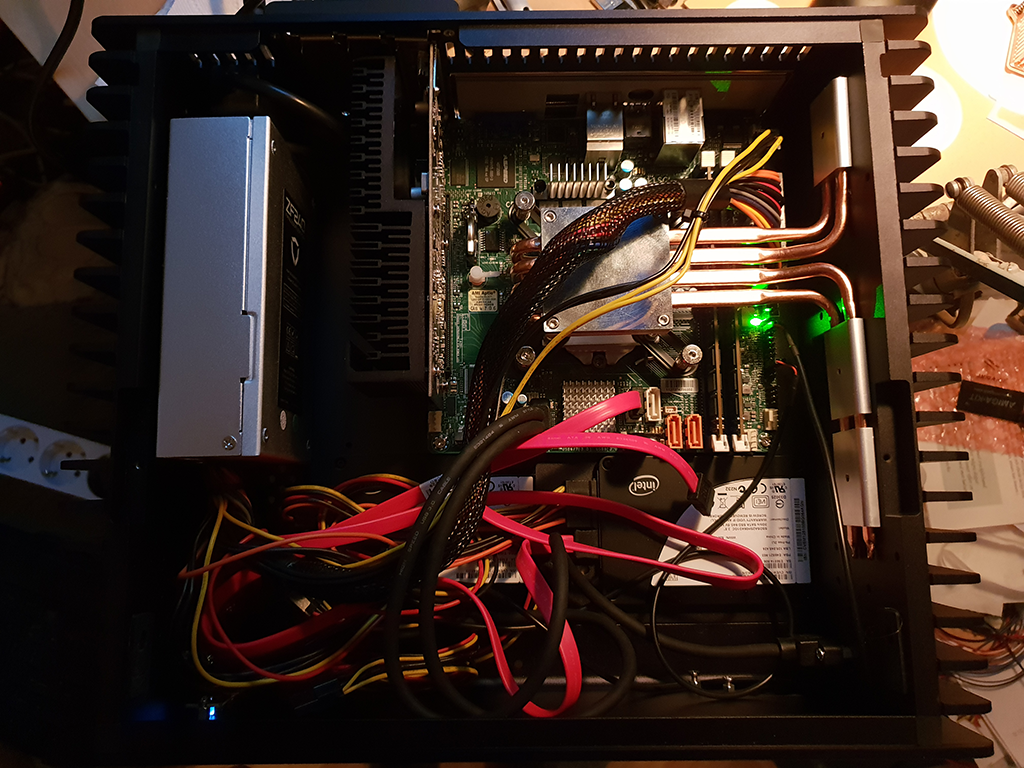
However, it is pretty unforgivable that the cooling sucks in air from the bottom where it would pick up any dust on the table and might clog the electronics of the power supply. Especially as it is not possible to easily clean the internals of the machine. If just the aluminum housing of the machine could be easily removed, I would consider this machine a great design - but not so as it is.
I wonder whether one should carefully apply some filter gaze around the air intakes to reduce dust intake into the machine.